Educators have frequently discussed computational thinking (or CT for short) as a critical component of 21st Century Skills. Computer scientists like Seymour Papert, Alan Perlis, Marvin Minsky, and Jeannette Wing have envisioned an essential part of every child’s education. This article will explore Computational Thinking and some ideas on how every teacher can bring it into their classroom.
Jeannette Wing from Columbia University defines it as, “Computational thinking is the thought processes involved in formulating a problem and expressing its solution(s) in such a way that a computer-human or machine—can effectively carry out.” In other words, CT allows us to take a complex problem, understand what the problem is and develop possible solutions. We can then present these solutions so that a computer, a human, or both, can understand.
Decomposition – breaking down a complex problem or system into smaller, more manageable parts
Pattern recognition – looking for similarities among and within problems
Abstraction – focusing on the important information only, ignoring irrelevant detail
Algorithms – developing a step-by-step solution to the problem or the rules to follow to solve the problem
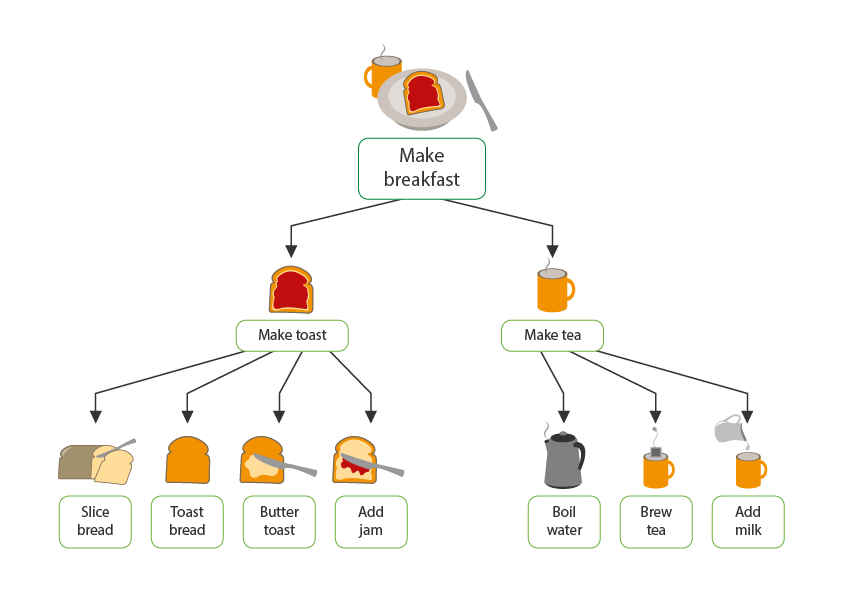
An easy way to visualize CT in action is to think about making a simple breakfast. Next, imagine making peanut butter and jam sandwich with tea. You now have the end goal. From here, you work backward and make the dishes by putting together the ingredients and most minor manageable actions.
Computational thinking in the classroom is not limited to the Computer Science lesson. It can be integrated into various subjects, for example:
Language Learning / Literature: In younger grades or for students learning a new language, make word/phrase cards about a story or sequence of events and ask the students to use logic and their general awareness to put together the jumbled story in the correct order. Older students can “program” a story with alternate pathways, i.e., create a Choose Your Own Adventure game.
Mathematics: Use decomposition to solve word problems and express generalizations (as algebraic representations) by identifying and recognizing patterns after analyzing data.
Business Studies/Economics: Making a decision tree for business decisions/choices, making financial models, business plans, and exit plan scenarios, or getting students to develop menus and recipes for a restaurant.
Social Sciences: Study data and Identify patterns/trends in wars & other historical events, then create visualizations of these patterns and trends.
With computing becoming ubiquitous in all walks of life, industries, and organizations, it is of critical importance that educators infuse Computational Thinking across the curriculum. This will help students develop a strong foundation for 21st-century skills and the ever-evolving and rapidly changing world of work.
We’d love to hear from you if you’d like to learn more about using BSD Education’s Digital Skills Curriculum to bring Computational Thinking into your classroom.
A couple of years ago, I wrote an article about the true meaning of digital citizenship. I spoke about being a digital citizen and what it means to be a ‘good’ digital citizen. As of January 2021, almost 60% of the global population are active internet users (4.66 billion people). I was recently with a friend’s 15-month old who can’t walk but knows how to scroll on a smartphone.
How often are children really using technology?
CHILDWISE estimates that between September and November of 2020, children between 7 and 16 spent an average of 3 hours and 48 minutes online each day. The time increased as they got older, with 7-8-year-olds reporting they spent an average of 2 hours 54 minutes online. In contrast, the 15-16-year-olds spent 4 hours and 54 minutes. Living in a global community of digital citizens that is more connected and younger than ever before, means the time spent online only going one way.
But is this community always spending their time using technology to make the world a better place for themselves and others? Is everyone a ‘good’ digital citizen? Of course, we know the answer is, unfortunately, no.
To name a few of the challenges, we’ve all seen the impact of fake news, hacking, and cyberbullying. For example, almost 80% of consumers in the US reported having seen fake news on the coronavirus outbreak, 80% of reported fraud in the UK is cyber-enabled. In addition, a survey of more than 6000 10-18-year-olds from June to August last year found that about 50% of children had experienced at least one kind of cyberbullying in their lifetime.
There is a huge need to teach students about digital citizenship.
Given this, there is a huge need to teach students about digital citizenship. But I think it’s vital to dive into what should be covered in this space and how. All too often, digital citizenship is another box to tick. Lesson on internet safety? Done. Or it focuses on the cons of being a digital citizen. But digital citizenship is so much more than that. The world is a digital place with huge potential, and our digital lives aren’t separate from our everyday life. That’s why at BSD Education, all of our curriculum is infused with learning opportunities in digital citizenship so that students see how it is a natural part of interacting online and in virtual communities instead of a solo practice.
As well as integrating digital citizenship across students’ learning, we can also think about the content in three key areas:
Using digital technologies positively for yourself
Communicating online and engaging respectfully with others
Safeguarding
Community guidelines
Safe-spaces agreements
Using digital technologies to make positive change in the world
Topics include:
Digital literacy and digital skills
Freedom of speech
The power of virtual communities and online movements
Open Source Software
Blockchain
Decentralized media
Censorship
By focusing on using digital technologies positively, infusing the learning across topics and subject areas, and broadening the conversation beyond personal responsibility, we show our students the possibilities of operating in the digital space and being active digital citizens. ISTE summarizes it brilliantly – ‘Digital citizenship is about more than online safety. It’s about creating thoughtful, empathetic digital citizens who can wrestle with the important ethical questions at the intersection of technology and humanity.’ So let’s think about any opportunities we have to excite our students about using digital technologies to bring about positive change for themselves, others, and broader society.
Given how widespread technology is, teaching coding is becoming more and more necessary. Knowing how to code—or at least the basics of coding—is now an important skill for students moving into higher education and when they begin looking for a job.
Teachers have identified this important skill and children are now learning how to code at an early age. However, with a wide range of options available for educators to begin teaching their students how to code, it’s important to make an informed decision that will set students up for success.
Block-based coding has emerged as a tool to offer students an introduction into the world of coding that allows them to explore code in a friendly environment. At BSD Education, we are fans of how block-based learning like Scratch has helped to reach millions of students globally.
While educators can instantly begin introducing digital skills into their classroom with this type of instruction, teachers should also understand the limitations of this tool. In this article we’ll explain why BSD feels traditional text-based coding is key for teachers and students that want to move beyond the blocks and are ready to take their digital skills to the next level with text-based programming like HTML, CSS, and JavaScript.
First, let’s make it clear what block-based and text-based coding are:
What is Block-based Coding?
Instead of traditional text-based coding, block-based coding involves dragging “blocks” of instructions to manipulate the code. The most popular example of this is Scratch, the first block-based language created by MIT. Other examples include Snap, Scratch Jr., and Microsoft MakeCode.
What is Text-based Coding?
Text-based coding is what professionals use and is done by typing keyboard characters following a certain syntax (rules and regulations) of a particular programming language. For a breakdown of coding languages, please see this previous BSD blog post.
Why Text-based Coding
Learning any new language is difficult, but at BSD we believe it is important to introduce text-based coding to students from third to eighth grade so they move past the blocks, become familiar with a real coding environment, and build a foundation that has no limitations. While many teachers begin with block-based coding to help ease their students into learning this new language, introducing students to text-based coding is inevitable and will be necessary when expanding students’ knowledge.
Here are three specific reasons why text-based coding is our preferred method of learning how to code:
1. Better to Learn with Text-based Coding
While block-based coding can be an avenue to introduce coding to students, it’s much more difficult for students to grasp real coding concepts and syntax when they’re essentially dragging and dropping boxes. With text-based coding, students receive a full learning experience that instills important coding concepts that they will remember and can build off of.
An MIT study revealed that while students are in the best stage of their lives to learn a new language until they are 17 or 18 years old, the optimal age for learning a new language is before the age of 10. At BSD Education, we feel learning coding is very similar to learning a new spoken language and that it’s important to take advantage of this window of opportunity by introducing students to actual coding concepts through text-based coding at an earlier age so they are more likely to comprehend and build on their skills in the future. Since a child’s brain is more pliable, a real coding experience can help them integrate this important skill and provide them with a massive advantage the younger they begin.
Since learning coding or any new language can be difficult, it’s critical you have a partner and a platform that can guide students through this experience. At BSD, we’ve developed more than 600 hours of certified curriculum that uses a scaffolded approach so students are constantly building on their knowledge. Whether it’s basic concepts or moving into advanced stages of coding learning, BSD is by your side to help students along.
Learning coding syntax is made easy with BSD Education as a partner in the classroom.
2. Text-based Coding Builds Adaptability and Resilience
A key aspect of learning something new is making mistakes, identifying what went wrong, and then fixing those mistakes. With block-based coding, making and learning from mistakes isn’t as prevalent since students are working within the confines of predetermined blocks of code and can’t reach outside of those boundaries. By moving blocks around, students are learning the general idea of how coding works, although not necessarily the skills beyond that.
Meanwhile, text-based coding presents many real-world challenges that help students actually learn how to solve problems. Since students are given the freedom to customize and extend themselves beyond drag-and-drop actions, text-based coding allows students to grow by making mistakes. Through this learning experience, students will build the knowledge they need to code as well as the adaptability and resilience they need for anything they do in school or life.
Due to these additional obstacles presented while using text-based coding, it’s important to have a tool that guides both the student and teacher through their coding journey. Using BSD’s guided projects, students receive regular prompts and can track their progress in real time so they can overcome challenges on their own and feel confident to reach for more.
BSD’s guided projects are like having another teacher in the room, making learning how to code easier on students and teachers.
3. The Sky’s the Limit with Text-based Coding
There are no limitations with text-based coding the way there are with block-based coding. Students looking to build their coding skills, and even possibly choosing a related career path, will need to use text-based coding. While block-based coding can work as an introduction to the world of coding, students are limited to the blocks available to them and prevents further development as a programmer past a certain point. As students gain more experience, block-based coding does not offer more dynamic and expressive capabilities that are available through text-based coding.
Even if students don’t choose a career path in technology, having these foundational skills they are learning with text-based coding can be applied to any job they pursue. Through learning real coding skills as opposed to drag and drop programs, students can develop a broad range of skills that include key computational thinking and critical thinking skills vital to learning in any core subject.
Give Students a REAL Coding Experience
Using text-based coding can seem like a difficult task, particularly for inexperienced teachers. However, the reward of seeing students learn real-world coding skills and build on a foundation of knowledge they can apply to any career in the future is well worth the initial challenges.
Teaching coding and digital skills is now easier than ever by partnering with BSD. With an intuitive platform that guides students through a variety of projects, a scaffolded approach that helps students build on their skills, and unrivaled support so ANY educator of ANY subject can begin teaching real coding skills today, BSD is your answer in the classroom.
Contact us today so we can address your unique needs and develop a partnership that will help your students reach further and have an experience that will equip them with the skills they will need for tomorrow, no matter what career path they choose.